




For companies and professionals handling statutory financial reporting, the question is rarely just "What is the XBRL software price?" The more useful question is what the software includes for that price. XBRL preparation involves mapping financial information, working with taxonomies, validating an instance document, checking errors and preparing the required filing output. A tool that reduces manual work can have a different value from a basic utility that only handles part of the process.
For this reason, anyone comparing XBRL solutions should first understand how the pricing is structured and what capabilities are included. A useful starting point is to review the features offered by an XBRL filing software solution, then compare those capabilities with the actual requirements of the finance or compliance team.
Why XBRL Software Prices Differ
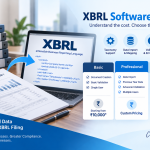
There is no single standard price for every XBRL software product. Publicly available listings in India show different pricing models, including annual subscriptions, one-time licenses and separate charges for updates. For example, current listings for Gen XBRL show prices around ₹10,000, while other software providers publish different installation and update charges. These figures are examples rather than a universal market rate.
The difference usually comes down to what the software is designed to handle.
A basic tool may focus on creating and validating XBRL documents. More complete systems can include data import, previous-year data mapping, validation checks, taxonomy support, PDF generation, backup and filing-related utilities.
This means two products with similar-looking prices may provide very different amounts of functionality.
The Main Factors Behind XBRL Software Price
1. Taxonomy and compliance support
XBRL reporting depends on the applicable taxonomy and business rules. MCA documentation describes a process involving the creation of an XBRL instance document, taxonomy selection, validation, pre-scrutiny and attachment to the relevant e-form.
Software that keeps these requirements within the workflow can reduce the amount of manual checking required from the user.
When comparing prices, check whether the software supports the taxonomy relevant to your reporting requirements and whether updates are included in the license or charged separately.
2. Mapping and tagging capabilities
Mapping is one of the more time-consuming parts of XBRL preparation. Financial and non-financial information needs to be associated with the appropriate XBRL concepts.
Some software allows users to bring previous-year information into the current workflow, import data from common file formats and map financial information against the applicable taxonomy.
For a CA, CS or finance team preparing multiple reports, these features can have a direct impact on the time required for each filing.
3. Validation and error checking
A low-cost tool may appear attractive until the team starts spending significant time identifying errors manually.
MCA's filing documentation includes validation and pre-scrutiny as part of the filing workflow. The instance document also needs to conform to the relevant business rules.
Therefore, when comparing XBRL software price, look beyond document creation. Check whether the software provides built-in validation, error identification, alerts and other checks before the final submission stage.
4. Data import and previous-year information
Repeatedly entering the same company information can increase preparation time, particularly for professionals handling multiple entities.
Features such as Excel, XML or other data-import facilities and previous-year data retrieval can make recurring filing work easier.
The value of these features depends on the volume of work. A company preparing one occasional report may not need advanced import functionality, while a professional firm handling several clients may benefit significantly from it.
5. Number of users and deployment model
The price can also change depending on whether the software is intended for a single user, multiple users or a server-client environment.
For example, software registration options can distinguish between single-user, multi-user and server-client configurations.
Before purchasing, identify who will actually use the software. A finance department with several people preparing or reviewing XBRL reports may have different requirements from an individual professional.
A Better Way to Compare XBRL Software Cost
Instead of comparing only the headline price, create a simple feature-and-cost comparison.
| Factor | What to check |
|---|---|
| License | One-time, annual or subscription-based |
| Updates | Included or separately charged |
| Taxonomy | Relevant MCA taxonomy support |
| Data import | Excel, XML or other formats |
| Previous-year data | Available or manual entry |
| Validation | Built-in checks and error identification |
| Filing support | Support for relevant XBRL forms |
| Users | Single-user or multi-user |
| Backup | Backup and restoration options |
| Support | Technical assistance and updates |
This approach gives a more realistic picture of the total cost.
For example, software priced at ₹10,000 with limited functionality may require additional manual work, while a more comprehensive product at a higher price could reduce preparation time. The reverse can also be true, so the feature set needs to be evaluated rather than assuming that a higher price automatically means better value.
What About Cost-XBRL?
Cost-XBRL is a separate consideration for organisations that have applicable cost audit or cost compliance reporting requirements.
The workflow can involve importing company information, bringing in previous-year data, importing financial information from Excel, working with Cost Audit or Cost Compliance Reports, tagging text blocks and validating the resulting instance document.
Webtel's Cost-XBRL software describes features such as company master-data import, previous-year data import, Excel data transfer, Word report import, text-block tagging, in-built validations and generation of a Cost-XBRL instance document.
This is important when evaluating pricing because a company requiring both standard XBRL and Cost-XBRL capabilities may need to assess them as separate requirements rather than assuming that one product covers every reporting workflow.
Should You Choose the Cheapest XBRL Software?
Price should be one part of the decision, not the only criterion.
A cheaper product may work well when the reporting workload is small and the user already has the technical knowledge needed for XBRL preparation. A more feature-rich system can make more sense when several entities are being handled, previous-year information needs to be reused, or the team wants stronger validation and error-checking support.
Support is another factor that is easy to overlook. If an issue occurs close to a filing deadline, access to technical assistance can have practical value that is not visible in the initial software price.
It is also worth checking how updates are handled. Regulatory and taxonomy-related requirements can change, so a pricing model that looks inexpensive initially may have additional update or maintenance costs later.
Calculate the Cost Per Filing, Not Just the License Price
One practical way to compare software is to estimate the cost of each filing.
Suppose a professional handles 20 XBRL assignments during a year. A software license costing ₹10,000 would represent ₹500 of software cost per assignment before considering other expenses.
Now consider the time saved through data import, previous-year mapping and automated validation. If those features reduce manual preparation across multiple assignments, the effective cost per filing can become more reasonable.
This calculation should also include:
-
Software license or subscription
-
Update charges
-
Additional user licenses
-
Training or onboarding
-
Support requirements
-
Internal staff time
-
Outsourcing costs, if applicable
The result is a more useful comparison than simply asking which product has the lowest listed price.
Questions to Ask Before Buying
Before selecting an XBRL solution, ask the vendor:
-
What is included in the quoted price?
-
Is the price one-time or recurring?
-
Are future software updates included?
-
Which MCA taxonomies are supported?
-
Can previous-year data be imported?
-
Can Excel or XML data be imported?
-
Does the software provide validation before filing?
-
How many users are included?
-
Is technical support included?
-
Are Cost-XBRL requirements covered separately?
Getting these answers in writing makes it easier to compare different products on the same basis.
The Real Meaning of XBRL Software Price
The listed XBRL software price tells only part of the story. The more meaningful measure is what the software delivers for that cost and how much manual effort it removes from the reporting process.
For CA and CS firms, finance teams and companies handling recurring XBRL work, features such as taxonomy support, data mapping, validation, previous-year data reuse, backup and user management can matter as much as the initial license amount.
A practical buying decision therefore starts with the reporting workflow, then evaluates the software against that workflow. Once those requirements are clear, the price becomes easier to interpret and compare.