

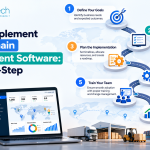






Implementing new supply chain technology involves more than choosing a platform and moving business data into it. Businesses must understand existing operational challenges, connect different systems, prepare employees, and ensure that daily activities continue without unnecessary disruption.
A structured implementation roadmap helps organizations manage this transition effectively. From defining business requirements to testing integrations and monitoring performance, every stage plays a role in building a reliable supply chain operation. The goal is to improve visibility, reduce manual work, and create a system that can adapt as business needs evolve.
Why Is a Structured Supply Chain Software Implementation Important?
Supply chain operations involve multiple connected activities, including procurement, inventory management, warehousing, production, and transportation. When these functions rely on disconnected systems, businesses may experience data inconsistencies, delayed decisions, and avoidable operating costs.
A structured implementation of supply chain management software helps businesses connect these activities within a coordinated workflow. It also establishes clear objectives, assigns responsibilities, and identifies potential risks before deployment.
With proper planning, businesses can improve inventory accuracy, strengthen supplier coordination, automate routine processes, and measure performance against defined targets. A well-managed implementation also reduces the likelihood of costly rework and operational disruption.
Step-by-Step Roadmap to Implement Supply Chain Management Software
Each implementation should follow a process that reflects the organization's operational complexity, technology infrastructure, and business objectives.
Step 1: Assess Existing Supply Chain Operations
Start by reviewing how your business currently manages purchasing, inventory, production, warehousing, and deliveries. Identify recurring problems, such as stock discrepancies, delayed supplier orders, manual reporting, and limited shipment visibility.
Consult the teams responsible for these activities to understand where workflows break down and which processes consume the most time. Document existing applications, data sources, and dependencies.
This assessment establishes a practical baseline and helps determine which problems the new system must solve first.
Step 2: Define Business Requirements and Implementation Goals
Once the current challenges are clear, establish specific objectives for the implementation. These might include reducing stockouts, improving order fulfillment accuracy, shortening procurement cycles, or gaining better visibility across warehouse locations.
Define measurable key performance indicators (KPIs) to evaluate progress. For example, a business could track inventory accuracy, order cycle time, supplier delivery performance, and fulfillment costs.
Prioritize requirements by business impact rather than attempting to implement every possible feature immediately. Clear priorities help control project scope and keep the implementation aligned with operational needs.
Step 3: Choose the Right Software Solution
Evaluate whether an existing platform, a custom-built solution, or a hybrid approach best fits your requirements. Compare available options based on functionality, scalability, integration capabilities, security, and total cost of ownership.
Essential features may include demand forecasting, inventory tracking, procurement automation, supplier management, warehouse coordination, and shipment tracking. Businesses with specialized workflows may require additional customization.
Consider how the software will support future growth, including additional warehouses, suppliers, products, and sales channels. The right solution should address current operational problems without creating unnecessary complexity or excessive maintenance requirements.
Step 4: Plan Data Migration and System Integration
Data migration and integration are critical because supply chain operations depend on accurate, consistent information. Identify the records that need to be transferred, including product catalogs, supplier details, inventory levels, purchase orders, and shipment records.
Clean outdated or duplicate data before migration and establish validation procedures to confirm accuracy after transfer.
Next, plan integrations with existing ERP, CRM, accounting, eCommerce, warehouse management, and transportation systems. These connections allow information to move between departments without repeated manual entry.
Document integration dependencies and test data exchanges early to identify compatibility issues before they affect live operations.
Step 5: Customize Workflows and Configure the System
Configure the software to reflect how your business operates. This may involve setting up procurement approvals, inventory replenishment rules, supplier workflows, warehouse processes, user permissions, and reporting dashboards.
For example, a retailer may need automated low-stock alerts across multiple locations, while a manufacturer may require material planning linked to production schedules.
Avoid unnecessary customization. Excessive modifications can increase development costs, complicate future upgrades, and make maintenance more difficult. Prioritize configurations that solve documented business problems and support measurable operational improvements.
Step 6: Test the Software and Train Employees
Before deployment, test the system against realistic business scenarios. Verify that inventory updates, purchase orders, supplier notifications, shipment tracking, and integrations work as expected.
Testing should cover:
-
Functional testing: Confirm that individual features operate correctly.
-
Integration testing: Verify that connected applications exchange data accurately.
-
Data validation: Check migrated records for completeness and consistency.
-
User acceptance testing: Confirm that the system supports real-world workflows.
-
Security testing: Review access permissions and protection of business information.
Alongside testing, provide role-specific training for procurement teams, warehouse staff, managers, and other users. Employees should understand how the new system changes their daily responsibilities and where to find support.
Step 7: Deploy the Software and Monitor Performance
Once testing is complete, deploy the system using a phased rollout or a full launch, depending on the business's size and operational requirements.
A phased approach can reduce risk by introducing the software to one department, warehouse, or location before expanding further. During deployment, maintain a clear process for reporting issues and resolving critical problems.
After launch, monitor KPIs against the baseline established during planning. Review inventory accuracy, order fulfillment times, procurement costs, supplier performance, and system reliability.
Use the results to identify gaps, refine workflows, and prioritize improvements. Implementation should be treated as an ongoing optimization process rather than a one-time technology project.
Common Challenges in Supply Chain Software Implementation
Even well-planned projects can encounter obstacles. Recognizing these risks early helps businesses avoid unnecessary delays and expenses.
-
Poor data quality: Inaccurate or duplicated records can lead to incorrect inventory figures and unreliable reports.
-
Integration difficulties: Legacy systems may require additional configuration or middleware to exchange data effectively.
-
Employee resistance: Unfamiliar workflows can reduce adoption when training and communication are inadequate.
-
Budget overruns: Unplanned customization, migration work, and additional integrations can increase implementation costs.
-
Operational disruption: An inadequately planned rollout can interfere with purchasing, production, and fulfillment.
Businesses can address these challenges through realistic project planning, clear ownership, early testing, employee involvement, and contingency planning.
Best Practices for a Successful Implementation
Following a few practical principles can improve implementation outcomes and support long-term adoption.
-
Assign a project owner and define responsibilities across departments.
-
Involve IT, procurement, finance, warehouse, and operations teams from the beginning.
-
Clean and validate data before migration.
-
Prioritize essential features and expand functionality in manageable phases.
-
Establish measurable KPIs and review them throughout the project.
-
Provide ongoing employee training and technical support.
-
Schedule regular performance reviews to identify improvement opportunities.
These practices help ensure that the software supports actual business processes instead of simply reproducing existing inefficiencies in a new system.
Conclusion
Implementing supply chain management software successfully requires clear objectives, careful platform selection, reliable integrations, accurate data, and effective employee training. A step-by-step approach helps businesses manage implementation risks while improving operational visibility and efficiency.
EmizenTech helps businesses develop and implement supply chain software solutions aligned with their operational workflows, integration requirements, and growth objectives. With the right strategy and technology, businesses can build more connected, scalable, and resilient supply chain operations.
Frequently Asked Questions
1. How long does it take to implement supply chain management software?
Implementation timelines depend on system complexity, data migration requirements, integrations, customization, and business size. A straightforward deployment may take weeks, while a complex enterprise implementation can take several months or longer.
2. How much does supply chain software implementation cost?
Costs vary according to licensing, customization, integration, data migration, training, and ongoing maintenance. Businesses should evaluate the total cost of ownership rather than considering only the initial software price.
3. What are the biggest challenges during implementation?
Common challenges include poor data quality, legacy system integration, employee resistance, unclear requirements, budget overruns, and disruption to existing operations.
4. Should businesses choose custom or off-the-shelf supply chain software?
Off-the-shelf software can suit businesses with standard requirements and established workflows. Custom solutions may be more appropriate when specialized processes, complex integrations, or unique operational requirements cannot be addressed effectively by existing platforms.
5. How can businesses measure implementation success?
Businesses can track inventory accuracy, order fulfillment time, stockout frequency, procurement costs, supplier delivery performance, and user adoption. Comparing these metrics before and after deployment helps evaluate whether the implementation is delivering measurable value.